




Ethan’s Page-Level Favicon Override Plugin
Part of my Free WordPress Plugins and Themes section.
v1.0.0
A very short and simple plugin.
Say you have a global favicon for your website set through a different plugin, or just through HTML insertion with some “add code to head” type plugin (shameless plug here).
But you want just one specific post or page to have a different favicon.
But you can’t just add it to the head code on that specific page because then there are just two favicon codes, caching is weird, priority order is weird, and it’s 50-50 at best if anything works.
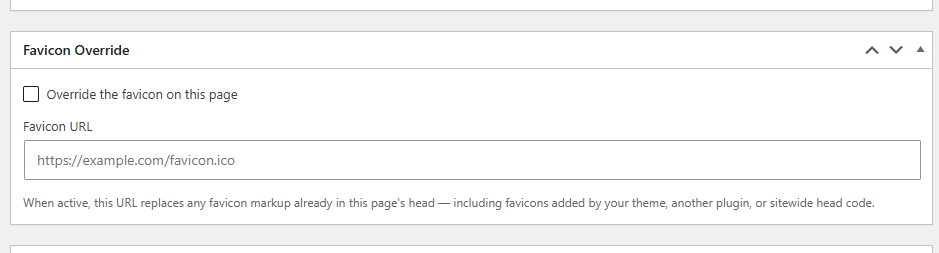
Well, this plugin adds a new field to every post/page edit screen that, when active, searches the head for any favicon code it can find, scraps it, and replaces it with a new image you set just for that post/page.
It’s not guaranteed to work on every single setup because sometimes they’re implemented in weird ways. You might also have to do a hard refresh and check in incognito mode at first because favicon caching is weird sometimes.
But it works for me. And if this page’s favicon is black and white, it clearly works for you too.
I built this specifically for my x-rays page.
Please note that this is presented as-is with no warranty or support because I am just a guy online offering you free stuff. Refer back to the full disclaimer here.
If you find this useful I would love to know your thoughts and comments. If you are a commercial company with a large tool budget, if you want to insert this as a $200 line-item in your $50,000 expense request, I’d be thanking you ’til July 19th, 2037. But hey, I just hope you get some use out of it and I’d love a thank you email if you do. Contact me here.
Download Link
DOWNLOAD ETHAN’S FAVICON OVERRIDE PLUGIN
Have a nice day!