




Ethan’s Use Shortcodes All Over WP Plugin
Part of my Free WordPress Plugins and Themes section.
v1.2.0
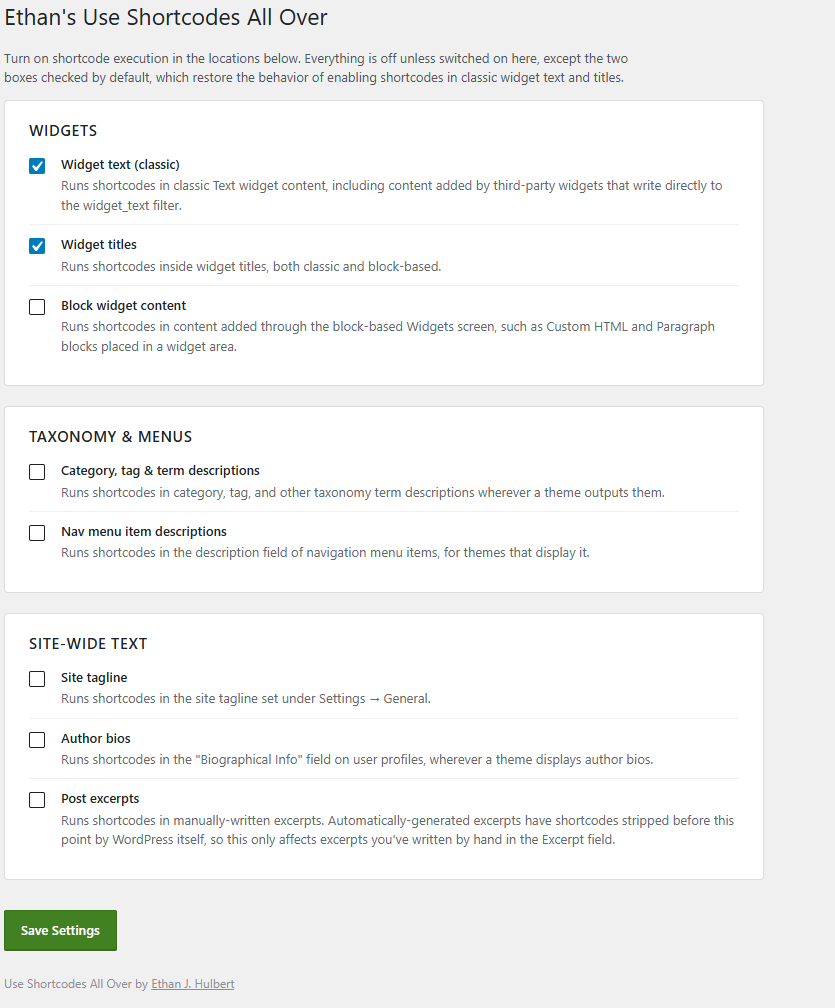
WordPress runs a shortcode almost anywhere in your post or page content without you thinking twice about it. Drop one into a widget title, a category description, or your site’s tagline, though, and you’ll get back exactly what you typed, nothing more, the brackets and all. This plugin closes a handful of those gaps, one at a time, so you decide where shortcodes work on an expanded and more granular level.
Widgets
Classic text widgets and their titles are covered the moment you activate the plugin, no settings required. If you build your widget areas with the block editor instead, there’s a separate switch for that, since Custom HTML and Paragraph blocks placed in a widget area work a little differently under the hood, and I didn’t want to assume you use one approach over the other.
Turn on the toggle for term descriptions, and a shortcode typed into a category or tag description will actually run, provided your theme displays that text somewhere. The same applies to the description field on individual items in your navigation menus — most themes never touch it, but a few put it to good use, and now yours can too.
The rest of your site
Three more switches cover other spots, because why not: your site’s tagline under Settings, the biographical info on a user’s profile, and any excerpt you’ve written by hand. That last one comes with a small catch, covered below.
Where to find it
Settings → Shortcodes All Over. Every location gets its own checkbox, grouped the same way as above, with a line explaining what it does before you turn it on.
Good to know
This plugin owes a lil something to a much smaller plugin called Use Shortcodes in Sidebar Widgets, by Kai Fenner, which did the classic-widget portion of this years before WordPress core caught up to it. Most of what that plugin did is now built into WordPress itself; this one picks up the parts that still aren’t.
Hand-typed excerpts will run shortcodes once you flip that switch, but auto-generated ones won’t — WordPress strips shortcodes out of those before this plugin ever gets a look at the text, as part of its own excerpt-trimming process. There’s no working around that short of overriding core behavior I’d rather leave alone.
Nothing here validates how suitable a shortcode actually is in any of these locations. Using shortcodes in these areas may finally fix that little issue that’s been bothering you, or, if you don’t know what you’re doing, it could totally confuse your layouts. That’s your business.
Please note that this is presented as-is with no warranty or support because I am just a guy online offering you free stuff. Refer back to the full disclaimer here.
If you find this useful I would love to know your thoughts and comments. If you are a commercial company with a large tool budget, if you want to insert this as a $200 line-item in your $50,000 expense request, I’d be grateful beyond your mildest dreams. But hey, I just hope you get some use out of it and I’d love a thank you email if you do. Contact me here.
Download Link
DOWNLOAD ETHAN’S USE SHORTCODES ALL OVER PLUGIN
Have a nice day!