





Ethan’s Spreadsheet to Shortcode Display Plugin
Part of my Free WordPress Plugins and Themes section. If you’re looking for the more technical documentation and instructions for this plugin, that’s here.
v1.2.0
If you’ve ever kept a spreadsheet of something — a wine collection, a client list, a catalog of stock, a set of recipes, anything organized into rows and columns — you’ve probably also had the thought: “I wish I could just put this on my website without retyping the whole thing by hand.” That’s exactly the itch this plugin scratches.
Ethan’s Spreadsheet to Shortcode Plugin (ES2S) lets you upload an Excel, CSV, or OpenDocument spreadsheet straight into WordPress, then pull any row of it into any post or page with a single, simple shortcode. Update the spreadsheet, re-upload it, and everywhere that data shows up on your site updates right along with it. No copy-pasting cells, no manually rebuilding tables, no keeping two versions of the same information in sync by hand.
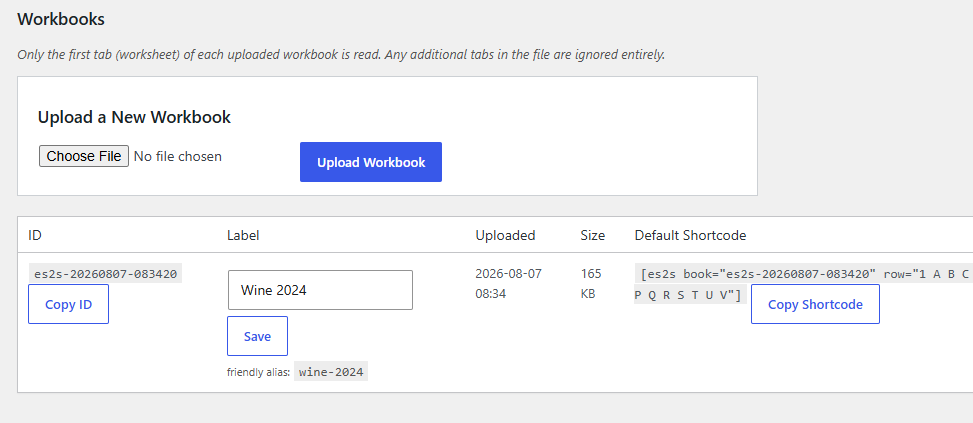
Turn Any Spreadsheet Into Website Content
Upload a workbook, and the plugin reads it straight through — headers, values, and all. You decide which row and which columns show up, and where, using a shortcode as short as:
Workbook not found.
That’s it. Row 3, columns A through C, dropped right into your post exactly where you put the shortcode.
Style Every Single Value, Individually
This is the part I actually built this plugin around. Every header and every value gets its own CSS class, generated automatically from what’s actually written in that cell — so you can target any specific piece of content, in any specific column, and style it however you like, without touching a line of PHP. Want every entry where the “Color” column says “Red” to actually render in red text, but only in that column? A couple lines of CSS handles it. Total, precise, granular control, no plugin settings screen required for the styling itself — just your theme’s stylesheet.
Upload More Than One Spreadsheet, Without Breaking Old Links
Real spreadsheets get updated. Maybe you fix a typo, add new rows, or replace the whole thing with a cleaner version. ES2S handles this the sane way: every upload gets its own permanent ID, and you can hand a workbook a friendly, memorable nickname too, so your shortcodes don’t have to look like a string of random numbers.
And, if you ever need to retire an old spreadsheet in favor of a new one, you can tell the plugin “anything still pointing at the old one should now point here instead” — so every shortcode you’ve already written anywhere on your site keeps working, automatically, without you hunting down and editing a single post.
Save Your Favorite Column Layouts
If you find yourself typing the same set of columns over and over, save it as a preset. Fill in which workbook and which row you want, and copy a ready-made shortcode straight to your clipboard. Small thing, but it adds up fast if you’re posting entries regularly.
Handles Big Spreadsheets Too
Columns that run past Z into AA, AB, and beyond are fully supported — you’re not capped at 26 columns. Only the first tab of a multi-tab spreadsheet is read, so keep the data you want displayed on that first sheet.
Where to Find It
Once activated, look for ES2S in your WordPress admin sidebar. From there you can upload spreadsheets, set up friendly aliases, manage retired workbooks, and build out saved presets, all from one screen.
Full documentation — covering exactly how the shortcode syntax works, how the automatic CSS classes are generated, and how the alias system behaves in detail — lives here: ES2S Documentation
Good to Know
- Supports
.xlsx,.xls,.csv, and.odsfiles. - Only the first tab of an uploaded spreadsheet is ever read — other tabs are ignored.
- ES2S grew out of an earlier, much smaller wine-specific plugin I’d originally commissioned from developer Jibran Shabir; this version is a full rebuild, generalized for any kind of spreadsheet-backed content.
Honestly, I built the original version of this for my own wine list and never even got around to putting the wine list online — but the tool itself turned out far more useful than the one thing I made it for, so here it is, rebuilt and ready for whatever spreadsheet you’re sitting on. But yes, that’s why all of these examples are wine-based.
Please note that this is presented as-is with no warranty or support because I am just a guy online offering you free stuff. Refer back to the full disclaimer here.
If you find this useful I would love to know your thoughts and comments. If you are a commercial company with a large tool budget, if you want to insert this as a $200 line-item in your $50,000 expense request, I’d be everlastingly grateful. But hey, I just hope you get some use out of it and I’d love a thank you email if you do. Contact me here.
Download Link
DOWNLOAD ETHAN’S SPREADSHEET TO SHORTCODE PLUGIN
Have a nice day!