




Ethan’s New Display Widgets WP Plugin
Part of my Free WordPress Plugins and Themes section.
v1.1.0
Not every widget needs to show up on every page. Maybe your “Related Downloads” widget only makes sense on product pages, or you want a signup form in the sidebar for logged-out visitors only, or a holiday promo widget that turns itself off on January 2nd without you having to remember to do it. This plugin adds a Display Rules panel to each widget so you can set that up directly, no extra sidebars, no template conditionals, no separate plugin for the date thing.
It works with classic widgets and block widgets, so it doesn’t matter which one your theme uses.
Show it, or hide it
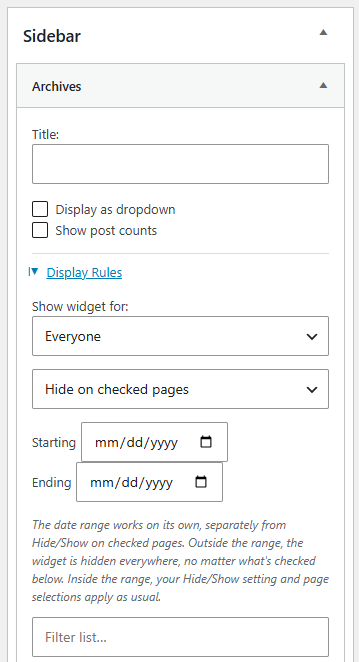
Every rule works both directions. Check the pages you want a widget to hide on, or flip it around and check the pages you want it to show on. Whichever way makes more sense for that particular widget.
Target by page, category, taxonomy, or post type
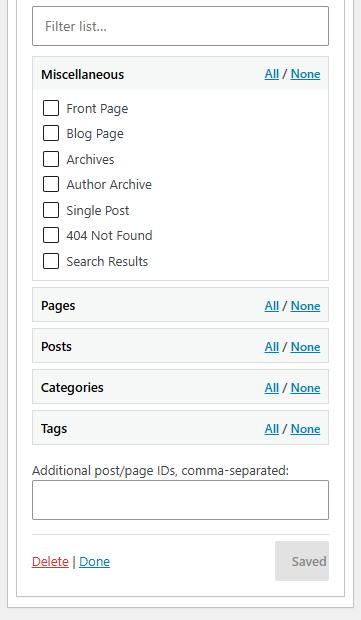
Front page, blog page, archives, search results, 404, any individual page, any category, any custom taxonomy, any custom post type or its archive. Check as many as you need. There’s also a plain text field for post or page IDs that aren’t covered by anything above.
Restrict by who’s looking
Show a widget to logged-out visitors only, logged-in visitors only, or a specific set of roles, like just administrators and editors.
Set a start and end date
Give a widget a date range and it handles itself. Useful for a seasonal sidebar banner or a widget tied to something that’s only relevant for a couple of weeks.
Works with block widgets
If your site uses the newer block-based widgets editor, or you manage widgets through the Customizer, you get the same Display Rules panel through the block’s own settings sidebar. Same rules, same options, just in the place block widgets keep their settings. (I’ve tested this less so let me know if it’s wonky at all, but it shouldn’t be.)
Quality of life enhancements
- A filter box for the checklist, so you’re not scrolling through eighty pages to find the one you want.
- Select All and Select None for each section.
- A “Restricted” badge on any widget that has rules applied, so you can tell at a glance without opening every widget one by one.
- If WooCommerce is active, the Shop, Cart, Checkout, and My Account pages show up automatically as targets.
Where to find it
Classic widgets: open any widget in Appearance > Widgets and look for Display Rules at the bottom of its settings.
Block widgets: select the block inside a widget area (Appearance > Widgets in block view, or the Customizer’s Widgets panel) and open Display Rules in the block’s Inspector Controls, over on the right.
Good to know
There used to be a plugin with almost this exact name and purpose, called Display Widgets, going back over a decade. It got sold off in 2017 and the new owners allegedly added a backdoor to it that let them publish content to any site running it, which is about as bad as a plugin can behave. It’s been gone from the WordPress repository since September of that year and you shouldn’t run it in any form if you find an old copy sitting around. This plugin was written independently, from nothing, and doesn’t share any code with it. Same basic idea but totally 100% clean build.
WPML users get an extra Languages section in the checklist automatically, matching whatever languages you’ve got set up.
No tracking, no external requests beyond what WordPress itself makes, no build step, nothing phoning home. Just checkboxes checkin’ boxes.
Please note that this is presented as-is with no warranty or support because I am just a guy online offering you free stuff. Refer back to the full disclaimer here.
If you find this useful I would love to know your thoughts and comments. If you are a commercial company with a large tool budget, if you want to insert this as a $200 line-item in your $50,000 expense request, I’d be grateful ’til the cows come home. But hey, I just hope you get some use out of it and I’d love a thank you email if you do. Contact me here.
Download Link
DOWNLOAD ETHAN’S NEW DISPLAY WIDGETS PLUGIN
Have a nice day!