


Ethan’s Classic Editor Styling & Reset Plugin
Part of my Free WordPress Plugins and Themes section.
v1.1.0
Some themes ship an editor stylesheet that has nothing to do with how your site actually looks to visitors and everything to do with making the writing screen harder to read. Oversized headings, odd colors, cramped spacing between lines. If you’ve ever opened a new post and wondered why the text looks nothing like plain WordPress, this plugin is for that.
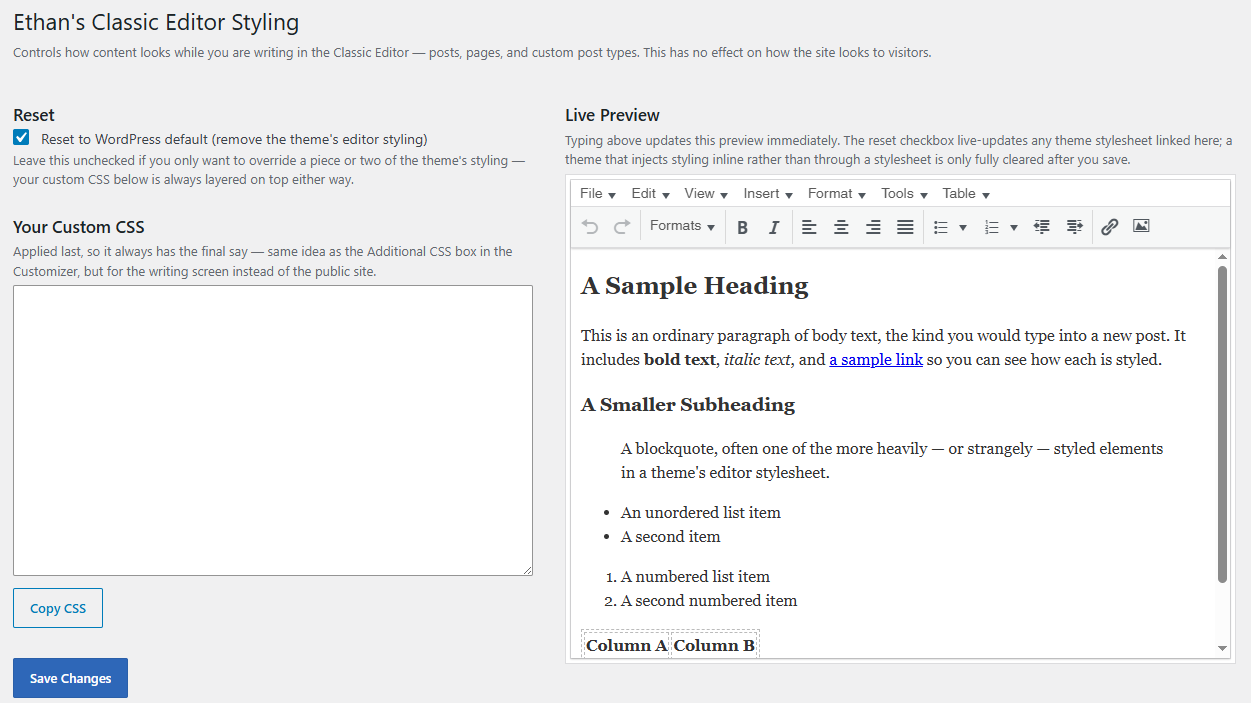
It gives you two controls, both from a settings screen. No stylesheet to open, no theme files to touch.
A checkbox that resets things to default
Check one box and the theme’s editor styling gets stripped out, leaving you with the plain, readable look WordPress uses out of the box. You don’t have to know what the theme changed or where it lives in the theme’s files. You just turn it off.
Leave the box unchecked and the theme’s styling stays exactly as it is. That matters if you only want to fix one or two things a theme did and otherwise don’t mind the rest of it.
Your own CSS, layered on top
Below the checkbox is a plain text box for your own CSS. Whatever you put there applies last, so it always wins, whether or not you’ve reset the theme’s styling underneath it. Same idea as the Additional CSS box in the Customizer, just aimed at the writing screen instead of the public-facing site.
There’s a copy button next to the box if you want to grab what you’ve written and keep it somewhere else.
A live preview that’s the real editor, not a guess
The settings page includes a small preview built from an actual TinyMCE editor, loaded with sample text: a heading, a paragraph, a blockquote, a couple of lists, a small table. Type in the CSS box and the preview updates as you go, because it’s running through the same engine your posts and pages use.
Where to find it
Once installed and activated, look under Settings → Classic Editor Styling in your WordPress dashboard.
Good to know
- This only affects the Classic Editor writing screen. Nothing changes on the front end of your site.
- Built for the Classic Editor specifically. It has nothing to do with Gutenberg or block-based editing.
- Most themes register their editor styling in a way this plugin can cleanly remove. A smaller number of themes inject their styling directly rather than through a separate file, and clearing that out is a trickier process. If you check the reset box and something still looks off, your own CSS box is the reliable fallback.
- Only users who can edit theme options will see this settings page.
I built this one out of my own frustration with a theme’s editor styling that I couldn’t figure out how to override without digging through unfamiliar theme files. Maybe you might like it too.
Please note that this is presented as-is with no warranty or support because I am just a guy online offering you free stuff. Refer back to the full disclaimer here.
If you find this useful I would love to know your thoughts and comments. If you are a commercial company with a large tool budget, if you want to insert this as a $200 line-item in your $50,000 expense request, I’d be long-lastingly grateful. But hey, I just hope you get some use out of it and I’d love a thank you email if you do. Contact me here.
Download Link
DOWNLOAD ETHAN’S CLASSIC EDITOR STYLING PLUGIN
Have a nice day!